Gacha Life
Screenshots



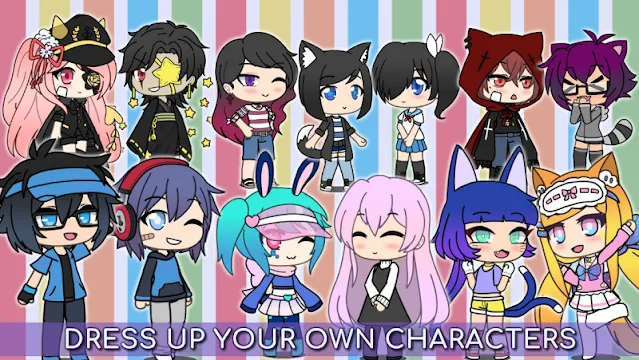
Do you love anime style and digital fashion? If so, you should explore Gacha Life on Android. Lunime developed this popular mobile game for creative minds. It allows players to design unique anime characters from scratch. You can choose from hundreds of dresses, shirts, hairstyles, and weapons. The game offers a massive wardrobe to match your personal style. It is currently available for free on the Google Play Store.
However, the fun does not stop at character creation. Once you design your characters, you can enter the famous Studio Mode. This feature lets you create your own scenes and stories. You act as the director. You choose the background, pose your avatars, and write their dialogue. Afterward, you can share your sketches with a huge community of players. This freedom makes Gacha Life a top choice for Android gamers.
How to Download and Install Gacha Life APK for Android
Do you want to create unique anime characters? Gacha Life is a popular game for storytelling and dress-up. Most users download it from the Google Play Store. However, some players need the Gacha Life APK file. This might be because they need an older version or don’t have access to the Play Store.
This guide will show you how to safely download and install the APK on your Android device.
Why Download the Gacha Life APK?
Sometimes, the official store is not an option. You might face these common situations:
- Regional Restrictions: The game is not available in your country.
- Device Incompatibility: Your phone is too old for the latest update.
- Specific Versions: You prefer an older version of the game.
Step 1: Prepare Your Android Device
By default, Android blocks external installations. You must change a specific setting to allow the APK installation.
- Open your Settings app.
- Scroll down and tap on Security or Privacy.
- Look for an option named “Install unknown apps” or “Unknown sources”.
- Select the browser you will use (like Chrome or Firefox).
- Toggle the switch to Allow.
Note: The exact path may vary slightly depending on your phone model.
Step 2: Download and Install Gacha Life APK
Now, you are ready to get the game. Follow these simple steps:
- Visit Filetomob.com From your android device.
- Search: Type “Gacha Life APK Download” in the search bar.
- Download: Click the Download APK button.
- Wait: Let the file finish downloading. You will see a notification in your status bar.
- Open the File: Tap the completed download notification.
- Install: A prompt will appear. Tap Install at the bottom of the screen.
The installation will take a few seconds. Once it finishes, tap Open to start playing!
Troubleshooting Tips
If the app does not work, try these quick fixes:
- Check Storage: Ensure you have enough free space on your phone.
- Redownload: The file might be corrupted. Delete it and download it again.
- Disable Play Protect: Sometimes, Google Play Protect blocks external apps. You can temporarily turn it off in the Play Store settings.
Gacha Life: Getting Started on Android
You installed Gacha Life on your Android device. Great! Now you are ready for the first launch. The initial steps are easy.
First Launch: What to Expect
You open the app for the first time. The game will quickly load.
- First, you see the welcome screen. This often shows key features.
- Then, the game presents a brief tutorial. Pay attention to these tips.
- It explains the basic controls. You learn how to move and select.
- The main screen then appears. This is your Hub. You access all modes from here. This includes Studio, Life, and Games.
Creating Your First Character
The Studio is where you create your avatar. Let’s make your very first character now.
Step 1: Enter the Studio
- Tap the “Studio” button on the main screen. This takes you to the creation hub.
- You see a default character. This character is ready for customization.
- Select the “Body” tab first.
Step 2: Customize the Basics
- Change the character’s skin tone. Use the color palette.
- Pick a new hairstyle. Choose from many options for the front and back hair.
- Next, select the eyes and mouth. These features show your character’s personality.
Step 3: Choose Clothes and Gear
- Tap the “Clothes” tab. This opens the outfit menu.
- Select a shirt, pants, and shoes. Mix and match items freely.
- Then, add accessories. Give your character hats or capes.
- You select weapons last. Give them a sword or a magic staff.
Step 4: Save Your Creation
- Look for the “Save” button. It is usually on the top right.
- Tap the button to store your character. Now you can use them in your stories!
Pro Tip: Find Inspiration Fast!
Character creation can feel overwhelming. There are so many choices.
- You should use the “Random” button.
- This button instantly generates a complete character. It gives you a random look.
- You can edit this randomly created character. This saves time.
- Use it to start with a fun design right away!
Now you know how to start the game and create your first Gacha Life character. Would you like to learn how to use the Studio Mode to create your first scene?
Gacha Life for Android: Key Features Overview
Gacha Life offers a fun, creative platform on Android devices. Players love this role-playing game. You can design your own anime-style characters. Then you make unique scenes and stories.
Character Creation & Customization
The game lets you build your perfect avatar. You customize characters extensively.
- You select from many outfits and accessories.
- Mix and match clothes, weapons, and hats easily.
- Next, you change physical features. Modify hairstyles, eyes, and mouths.
- Gacha Life gives you 20 character slots for all your creations.
Studio Mode and Storytelling
The Studio Mode empowers your inner director. It helps you bring your creations to life.
- You create custom scenes using your characters.
- Next, you add personalized text for dialogue.
- You choose from over a hundred backgrounds. This sets the perfect mood for your story.
- Use the Skit Maker to link multiple scenes. This lets you craft longer sketches or mini-movies.
Life Mode Exploration
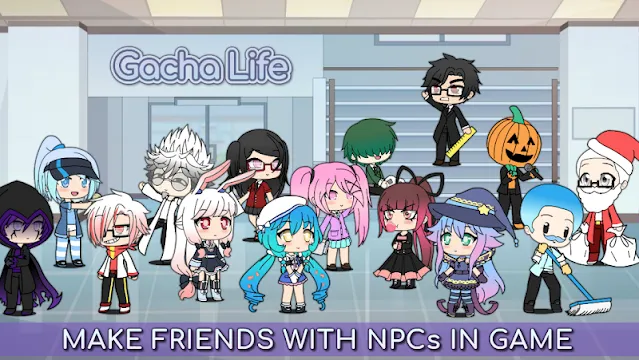
In Life Mode, you explore the Gacha world. You interact with non-player characters (NPCs).
- You visit various areas, like the town or school.
- You meet new NPCs during your travels.
- Then, you chat with these characters to learn their stories.
- Stamina powers your interactions. You must manage it carefully.
Mini-Games and Rewards
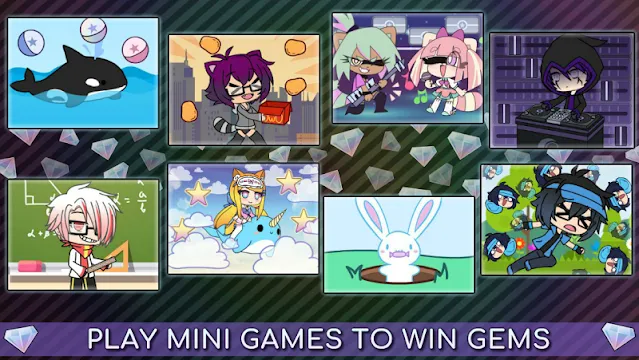
The app includes fun, simple mini-games. You play these games to earn rewards.
- The game offers 8 different mini-games. These include titles like “Duck & Dodge.”
- You collect valuable gems from playing.
- You then use these gems in the Gacha system.
- You Gacha for rare gifts. Give these gifts to NPCs in Life Mode.
Gacha Life lets you unleash your creativity and tell your own story.
Community & Social Features
Gacha Life connects players around the world. It provides a platform for sharing and interaction.
- You can chat and roleplay with other global players. This uses your own custom avatar.
- A Chat feature exists for social interaction. You must reach level 10 to unlock this function.
- The game lets you share your creations easily. You can post skits and characters on other social platforms.
- This feature encourages collaboration and community. Users often create content together.
Enhanced Studio Options
The core Studio Mode includes special tools for more dynamic scene creation. You get great control over your stories.
- You select from many poses and backgrounds. This offers wide visual variety.
- You add pets and various objects to your scenes. This makes the environment richer.
- The Skit Maker helps you combine scenes smoothly. You essentially make your own short animated videos.
Offline Play
Gacha Life is highly accessible. You can play it almost anywhere.
- You do not need Wi-Fi or internet to play.
- The game allows you to play offline in the Life and Studio modes.
- You enjoy all the core features without a constant connection.
Gacha Life Advanced Tips for Aspiring Creators
You love Gacha Life. Now, make your creations stand out! Use these advanced tips. They will help you become a top Gacha creator.
Character Design Secrets
Unique characters grab attention quickly. Stop using default settings. Be bold with your designs.
- Try Unexpected Colors: Do not use simple hair colors. Instead, mix uncommon shades. Try teal hair with deep purple eyes. This creates immediate interest.
- Layer Accessories Wisely: You can combine different hats and scarves. Find surprising pairings. Mix a formal jacket with athletic shorts. This gives your character personality.
- Focus on the Outline: Change the outline color on clothes or hair. A darker outline makes features pop. This adds visual depth.
- Use Adjustment Sliders: You can resize and reposition items. Make the eyes slightly bigger. Move the mouth a little lower. This gives your character a unique facial structure.
Storytelling 101
A great design needs a great story. Write dialogue that hooks your viewer.
- Start with Conflict: Your story needs a problem quickly. Introduce the main challenge in the first few scenes. This makes people keep watching.
- Write Realistic Dialogue: Characters should sound like real people. Avoid overly long or formal speeches. Use short, punchy lines.
- Show, Don’t Tell: Instead of saying a character is sad, show them crying or looking down. Use specific poses and facial expressions.
- Create Interesting Scenes: Vary your backgrounds. Do not use the same setting every time. Match the background to the current emotion or action. Use camera angles to create drama.
Saving and Sharing Your Work
You finished your masterpiece. Now, save it and show it off!
Saving Your Assets
- Character Slots: Go to the “Profile” area. Select a numbered slot and tap “Save.” This saves your character design for later use.
- Studio Scenes: In Studio Mode, take a screenshot of your perfect scene. The game saves the image to your device’s photo gallery.
- Skits: Use your device’s built-in screen recorder. Record the Skit Maker playback. This captures your full mini-movie.
Sharing Your Creations
- YouTube is Key: Most Gacha content lives on YouTube. Upload your recorded skits there. Use engaging thumbnails to get views.
- Social Media: Post character designs on Instagram or TikTok. Use relevant hashtags like #GachaLife or #GachaEdit.
- Showcase Your Edits: Many creators edit their screenshots using external apps. Enhance the colors or add special effects. Then, share the final image.
Joining the Community
Connect with other creators. Find inspiration and get feedback.
- Explore YouTube: Watch popular Gacha content creators. Learn their editing and storytelling styles.
- Visit Subreddits: The subreddit r/GachaLife is very active. Post your finished work there for critiques. You can also ask for design advice.
- Find Discord Servers: Many large Gacha channels host private Discord communities. Join these groups to chat directly with creators and fans.
Share your content widely. You can quickly become a recognized Gacha Life creator!
Gacha Life: A Crucial Note on Safety and Community (For Parents)
Parents should understand the Gacha Life ecosystem. The game itself is mostly safe. However, external content carries some risks. This guide gives you key safety information.
In-Game Safety: What You Should Know
Gacha Life once had a live chat feature. That unmoderated chat is gone. An older update removed it completely.
- Now, current in-game interaction is limited.
- Characters are pre-programmed NPCs (Non-Player Characters).
- Players chat with these NPCs. They follow a safe, set script.
- Therefore, the game app itself does not expose your child to live strangers.
The External Content Warning: “Gacha Heat”
Gacha Life is a powerful creative tool. Users create characters and skits. They post this content on platforms like YouTube and TikTok. This is where the main safety concern lies.
- The term “Gacha Heat” refers to inappropriate user-created content.
- This content often includes age-restricted or overly sexualized themes. It involves Gacha Life characters.
- These videos and images exist entirely outside the game. They violate the external platform’s rules.
- Therefore, the risks are on those platforms, not inside the Gacha Life app. You must monitor external viewing.
Parental Supervision: Practical Advice
Take proactive steps to ensure your child’s safety. Monitoring is key to managing this external risk.
- Monitor External Viewing Habits: Always check what your child watches on YouTube and TikTok. Look for content related to “Gacha.”
- Use Parental Controls: Implement parental control apps. Tools like Android Family Link manage screen time. They also restrict access to certain apps or content.
- Encourage Conversation: Talk openly about online content. Help your child understand what is appropriate. Ask them what they are creating or watching.
- Report Inappropriate Content: Teach your child to report harmful videos. You should also report any “Gacha Heat” content you find.
Gacha Life is fun and creative. With proper supervision, you can help your child enjoy it safely.
Frequently Asked Questions About Gacha Life for Android
Gacha Life is very popular. People have many questions about this game. Here are the answers to the most common questions.
What is Gacha Life?
Gacha Life is a free mobile game. You use it to create and customize anime-style characters. Then, you make skits and scenes in Studio Mode. Finally, you explore a virtual world in Life Mode.
Does Gacha Life cost money to play?
No, Gacha Life is completely free to download and play on Android. You do not need to spend money. However, the app includes optional in-app purchases. These purchases remove ads or give you extra gems faster.
Do I need an internet connection to play?
You do not always need the internet. You can enjoy the core features offline. The Studio Mode and most of the Life Mode are available offline. However, you need an internet connection to use the Chat feature and access the Gacha shop.
How many characters can I create?
You can create many characters. Gacha Life gives you 20 character slots. You use these slots to design unique avatars. You can customize them fully with outfits and accessories.
What is the difference between Studio Mode and Life Mode?
Studio Mode lets you direct and create. You place characters, add dialogue, and design scenes. It’s for making your stories.
Life Mode is for exploration and interaction. You walk around the Gacha world. You meet and chat with NPCs. You discover new locations.
How do I get more gems in the game?
You earn gems in a few ways. First, you can play the 8 mini-games. Second, you complete various daily tasks. You can also buy them, but you don’t have to. You use the gems to spin the Gacha and get gifts.
Is Gacha Life safe for kids?
Many kids enjoy Gacha Life. The app is generally safe. However, the live chat feature connects players globally. Therefore, parents should supervise young children using the chat function. Always use caution with online interactions.